


Z1 RaceTech
Accelerate your sim & racing performance with Z1 RaceTech.

Accelerate your sim & racing performance with Z1 RaceTech.

The ULTIMATE AI Race Coach.
Flattening the learning curve, finding the gains, getting you fast, quick.
Compatible with all major sim titles and many real world racing products
ACC
Assetto Corsa
AMS
Arca Sim Racing
EA F1
Harry's Lap Timer
iRacing
Race Chrono
RaceRoom
rFactor
ACC
Assetto Corsa
AMS
Arca Sim Racing
EA F1
Harry's Lap Timer
iRacing
Race Chrono
RaceRoom
rFactor
6.7m+
Number of Laps Analyzed
30,000+
Number of Hours Coached
20+
Number of Sims Supported
DON'T TAKE OUR WORD FOR IT.
SEE WHAT THE SIM & RACING COMMUNITY THINKS.
Testimonials
" I wish I had more time to race but I don't. Z1 makes every minute on track count by helping me get to know the track and get faster, quicker."
Rich M.
"I think I would be lost now, if I had to race without Z1."
Ian P.
"You guys nailed it with the new live instructor, so much great info, very helpful even for seasoned sim racers.
Steve E.
"An avid user since 2015 I have seen the Z1 suite grow to have an all inclusive feature list that is very remarkable against the competition. I'm excited to see how Z1 will try and set the bar in the years to come.
Miguel V.
"Love the new Driving Instructor. It is amazing!"
Sal P.
Will Power
Will Power
IndyCar Champion
I use Z1 software to work on my technique. It has everything you need to understand and analyze where you need to improve down to the smallest detail. It's a very important tool for my race preparation.
Z1 RACETECH PRODUCT SUITE
5 PROFESSIONAL RACING TOOLS TO HELP YOU LEARN FASTER & RACE QUICKER.
Z1 AI RACE COACH
AI-RACE COACH & CO-PILOT
Our cutting-edge AI Driving Coach is your personal mentor on the virtual track. Seasoned Pro or new to sim racing, It offers real-time guidance, lap by lap, helping you master the art of sim racing. Whether it's basics of learning the track, finding the perfect racing line, nailing the brake points, or maximizing acceleration or squeezing our fractions of seconds to gain a podium place, our coach is there to push your limits and unlock your potential.
Z1 Dashboard
Z1 DASHBOARD
VITAL STATS AT YOUR FINGERTIPS
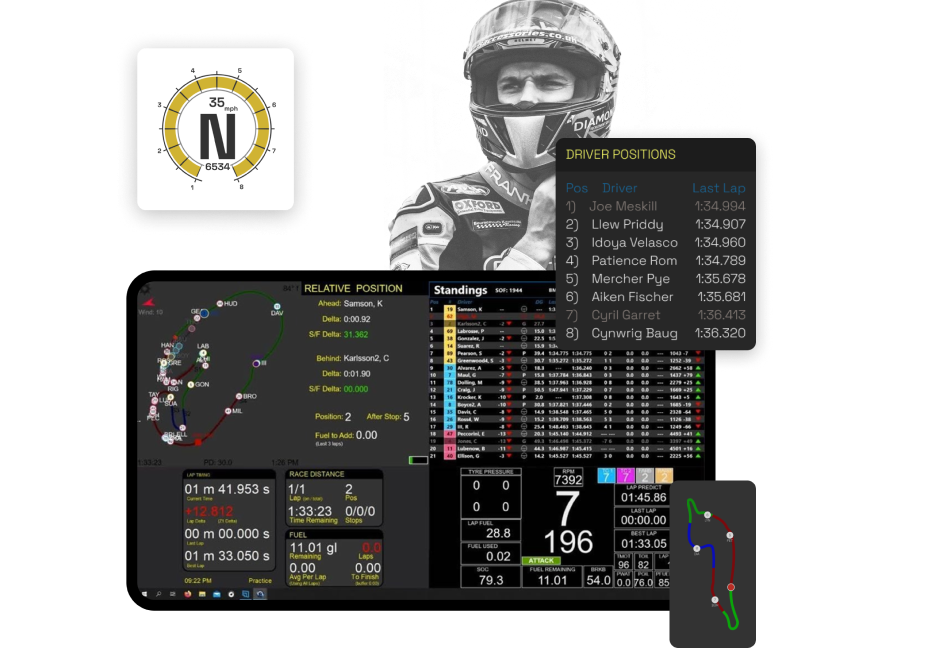
The Z1 Dashboard provides you vital statistics right where you need them. Fully configurable using our Dashboard Editor, giving you exactly what you need, whether you're just starting your journey or are a seasoned Pro.
  • Garage displays to help you learn about your current session out of the car
  • Speech and virtual engineer feedback including competitor tracking, weather, and standings
  • Live telemetry feedback for tire data, g-force and pedal inputs
  • Track maps including current position of all cars, your position after pit stop, time differences and pit lanes
  • 100's of premade dashboards available for your use and customisation
  • Z1 Dashboard
    Z1 Analyzer
    Z1 ANAYLZER
    PROFESSIONAL TELEMETRY ANALYSIS
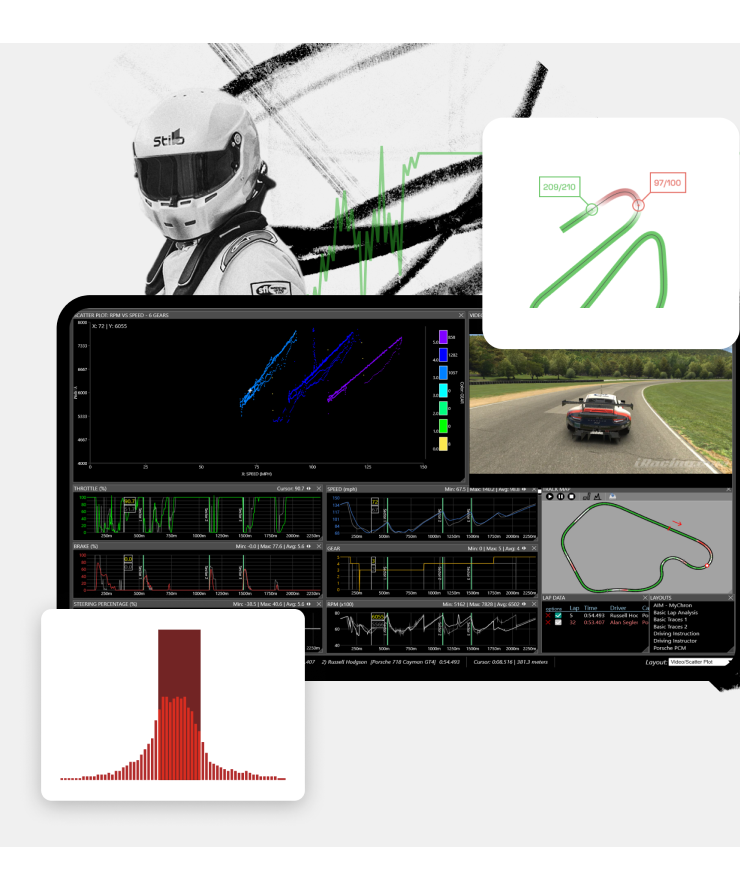
    The Z1 Analyzer is a full-featured and flexible telemetry application. Compatible with both sim and real-world data it can display telemetry in a myriad of ways from easily understood written overviews to complex user-defined layouts.
  • Lap overviews gives you a written overview of your lap. Includes paragraphs on your sectors, driving line, turn analysis, speed, brake lockups and ride heights.
  • The Speed Comparison Analysis shows the top speed you reach at the end of straights, and the slowest you reach in the turns.
  • The Brake Points Analysis shows the difference between braking points of two laps
  • Scatter Plots are an integral part of telemetry analysis and the Z1 Analyzer provides you with the ability to easily create and view them.
  • Z1 Designer
    Z1 DESIGNER
    CUSTOMIZE YOUR DISPLAY FOR OPTIMUM INSIGHT
    The Z1 Designer is a free application that lets you create your own dashboards for use with the Z1 Dashboard.
  • Create new dashboards or download existing ones from our gallery
  • Place the info you need exactly where you need it
  • Share your designed dashboards with the Z1 community
  • Z1 Designer
    Z1 Server
    Z1 SERVER
    MULTIPLATFORM CONNECTION, ALWAYS ON
    Perfect for connecting to the ecosystem of racing, be it leagues you are racing in or teams that you are running. The Z1 Server application allows you to broadcast your sim's data to any computer on your network.
  • Run Z1 Dashboard on any computer on your network
  • Broadcast the joystick button inputs allowing you to control the dashboard switching and other options from the main computer
  • Included with the Z1 software suite and can be registered using the same order number
  • Download: Gangstar Miami Vindication Apk Data Link Repack

    When downloading and installing APK files, be cautious of potential risks, such as malware or viruses. Here are some tips to keep in mind:

    This is the installation file. It contains the application's base code, user interface elements, and system permissions.

    Utilize a large arsenal of weapons, including machine guns, flamethrowers, and bazookas. Download Gangstar Miami Vindication APK + Data

    Here are some valuable tips and tricks to help you get started with Gangstar Miami Vindication:

    | File Type | Description | How to Install | | :--- | :--- | :--- | | | This small file is the game's installer, much like a .exe file on a PC. | Simply tap the APK file on your Android device and follow the on-screen prompts to install. Do not open the game yet. | | Data/OBB (Opaque Binary Blob) | This is the large data file containing all the game's rich 3D graphics, sounds, and missions. | 1. Copy the downloaded " gameloft " folder (or the specific folder containing the OBB file). 2. Navigate to your device's internal storage (or SD card). 3. Paste it directly into the main directory of your storage. Do not place it in the Android/data or Android/obb folders. | download gangstar miami vindication apk data link

    Mobility is a core element of the gameplay. The title features a broad selection of vehicles: Sports cars and muscle cars Motorcycles and agile scooters Speedboats and jet skis for aquatic navigation Helicopters for tactical aerial exploration 3. Extensive Arsenal

    : If you do find the data files (OBB), they typically need to be manually placed in the sdcard/gameloft/games/GloftGMHP directory, which may require specific file explorer permissions on modern Android versions. Modern Alternatives

    : Gangstar Miami Vindication does not require root access, device administrator rights, or access to your personal contacts and SMS messages. Deny any intrusive permission requests.

    Hunting down a reliable requires patience. The file is not on mainstream app stores, but with the right source (Archive.org or trusted forums) and this installation guide, you can relive the glory days of mobile open-world gaming. When downloading and installing APK files, be cautious

    Since there is no official source, users often turn to third-party "abandonware" sites. This carries a high risk of malware or adware bundled within the APK files [5]. How to Proceed Safely

    The Ultimate Guide to Gangstar: Miami Vindication – Nostalgia, Gameplay, and Android Compatibility

    : Turn off your internet connection on the first launch to bypass old, broken license verification servers. Compatibility and Troubleshooting Modern Devices

    The Android operating system requires data files to live in specific directories to read them. Copy or cut the extracted folder containing the game data. Utilize a large arsenal of weapons, including machine

    To enjoy this game seamlessly today, running it inside an Android emulator environment on a PC or using an older "virtual machine" app on your modern phone yields the highest success rate.

    The game data file holds the heavy assets. This includes 3D models, textures, voice acting, and radio soundtracks. Without this cache file properly placed in your system storage, the game will crash on launch or display a "download failed" error. How to Install the Game Safely

    Modern Android devices block installations from outside the Google Play Store by default. Go to your device . Navigate to Security or Apps & Notifications . Select Special App Access > Install Unknown Apps .


    Our Partners
    Wave Italy
    Motorsport UK
    Asher Racing
    Sim Core
    AI Racing Tech
    ESport Sim
    HRS
    Sim Worx
    Ricmotech
    Wave Italy
    Motorsport UK
    Asher Racing
    Sim Core
    AI Racing Tech
    ESport Sim
    HRS
    Sim Worx
    Ricmotech